Input
Input is the Bootstrap 5 text control: a native <input> with form styling,
validation classes, and NiceGUI value binding. Use it for short values — names,
emails, numbers, passwords — and switch to Textarea when the user needs more
than one line.
Basic usage
bs.input is the snake_case alias of bs.Input. Pair it with Label for an
accessible name; Input itself has no label argument. All examples run
inside bs.scope().
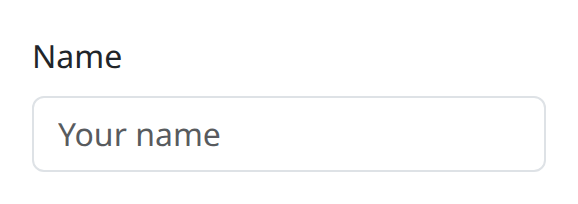
def demo() -> None:
    with bs.scope():
        bs.label("Name", html_for="name")
        bs.input(id="name", placeholder="Your name", debounce=300)
Live example
The snippet below is exactly what the demo service runs. The highlighted
demo() function is the same source the demo executes, not a rewritten copy.
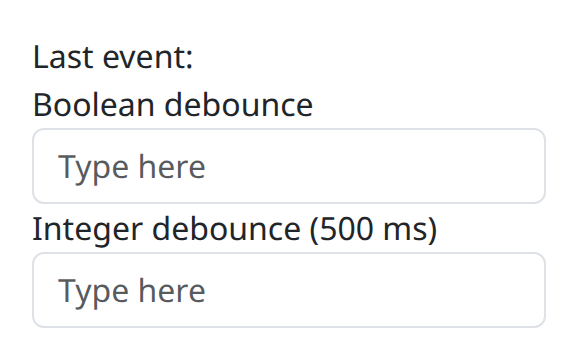
def demo() -> None:
    with bs.scope():
        last = ui.label("Last event:")

        def on_bool(*_args: object) -> None:
            last.set_text("Last event: boolean debounce")

        def on_int(*_args: object) -> None:
            last.set_text("Last event: integer debounce")

        ui.label("Boolean debounce")
        bs.input(placeholder="Type here", debounce=True, on_change=on_bool)
        ui.label("Integer debounce (500 ms)")
        # int debounce applies to the native surface
        bs.input(placeholder="Type here", debounce=500, on_change=on_int)
Options
placeholder, type, and size
placeholder is the empty-state hint. type defaults to "text" and accepts
the usual HTML types (email, password, number, search, and so on).
size is the Bootstrap control size (sm / lg), not the HTML size
attribute — that is html_size. For numeric types, min, max, and step
pass through to the DOM.
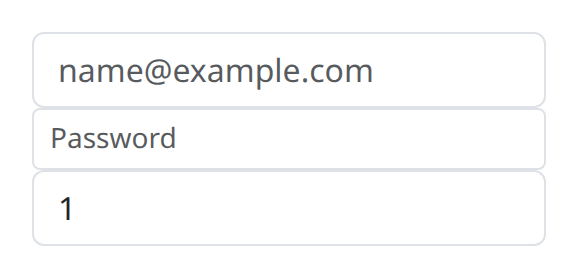
def demo() -> None:
    with bs.scope():
        bs.input(type="email", placeholder="name@example.com")
        bs.input(type="password", placeholder="Password", size="sm")
        bs.input(type="number", min=0, max=10, step=1, value=1)
debounce
debounce controls how often the Python value updates while the user types.
False (the default) publishes without an extra delay. True coalesces
updates. An integer is a millisecond delay, which is the usual choice for live
filtering or anything that hits the server on each keystroke.
Validation and state
valid and invalid apply Bootstrap validation classes. Compose them with
FormFeedback as shown on the Form page. required, disabled,
readonly / read_only, maxlength, pattern, autocomplete, name, and
list map to the native attributes. plaintext renders a read-looking control
for review layouts.
Value and events
value is the current string or number. on_change fires as the value
publishes (subject to debounce). on_submit fires when the control submits
— typically Enter in a text field — and n_submit counts those events.
on_blur / n_blur track focus leaving the control. persist defaults to
"off".
Notes
Counters such as n_submit and n_blur exist for DBC-style state, but the
NiceGUI-facing API is the Python callable: on_change, on_submit, and
on_blur. Bind with .value / bind_value the same way you would for other
NiceGUI value elements. The root tag is the native control, so form labels
should point html_for at the Input id.
Argument reference
| Property | Type | Default | DBC 2.0.4 name | Support (native) | Support (compat) |
|---|---|---|---|---|---|
| id | string | None | id | supported | supported |
| value | string | number | None | value | supported | supported |
| n_submit | number | 0 | n_submit | supported | supported |
| n_blur | number | 0 | n_blur | supported | supported |
| size | string | None | size | supported | supported |
| valid | boolean | None | valid | supported | supported |
| invalid | boolean | None | invalid | supported | supported |
| plaintext | boolean | None | plaintext | supported | supported |
| style | unknown | None | style | supported | supported |
| class_name | string | None | className | supported | supported |
| type | a value equal to: 'text', 'number', 'password', 'email', 'range', 'search', 'tel', 'url', 'hidden', 'time' | None | type | supported | supported |
| step | string | number | 'any' | step | supported | supported |
| disabled | boolean | None | disabled | supported | supported |
| placeholder | string | number | None | placeholder | supported | supported |
| debounce | boolean | number | False | debounce | extension | unsupported |
| html_size | string | None | html_size | supported | supported |
| autocomplete | string | None | autocomplete | supported | supported |
| autofocus | a value equal to: 'autoFocus', 'autofocus', 'AUTOFOCUS' | boolean | None | autofocus | supported | supported |
| inputmode | a value equal to: 'verbatim', 'latin', 'latin-name', 'latin-prose', 'full-width-latin', 'kana', 'katakana', 'numeric', 'tel', 'email', 'url' | None | inputmode | supported | supported |
| list | string | None | list | supported | supported |
| max | string | number | None | max | supported | supported |
| maxlength | string | number | None | maxlength | supported | supported |
| min | string | number | None | min | supported | supported |
| minlength | string | number | None | minlength | supported | supported |
| required | a value equal to: 'required', 'REQUIRED' | boolean | None | required | supported | supported |
| readonly | boolean | a value equal to: 'readOnly', 'readonly', 'READONLY' | None | readonly | supported | supported |
| name | string | None | name | supported | supported |
| pattern | string | None | pattern | supported | supported |
| tabindex | string | None | tabindex | supported | supported |
| persistence | boolean | string | number | None | persistence | unsupported | unsupported |
| persisted_props | list of a value equal to: 'value's | None | persisted_props | unsupported | unsupported |
| persistence_type | a value equal to: 'local', 'session', 'memory' | None | persistence_type | unsupported | unsupported |
| key | string | None | key | unsupported | unsupported |
| class_name | string | None | className | supported | supported |
| tabIndex | string | None | tabIndex | supported | supported |
| maxLength | string | number | None | maxLength | supported | supported |
| minLength | string | number | None | minLength | supported | supported |
| inputMode | a value equal to: 'verbatim', 'latin', 'latin-name', 'latin-prose', 'full-width-latin', 'kana', 'katakana', 'numeric', 'tel', 'email', 'url' | None | inputMode | supported | supported |
| autoComplete | string | None | autoComplete | supported | supported |
| autoFocus | a value equal to: 'autoFocus', 'autofocus', 'AUTOFOCUS' | boolean | None | autoFocus | supported | supported |