Form
Form is the Bootstrap 5 <form> wrapper for NiceGUI. It groups labels,
controls, help text, and validation messages so a settings page or wizard step
reads as one submission. Use it when you need native form semantics — submit
handling, novalidate, and optional action / method — rather than a loose
stack of inputs.
Basic usage
Place labels and controls inside bs.form. prevent_default_on_submit defaults
to true so the browser does not navigate away; handle the submit in Python.
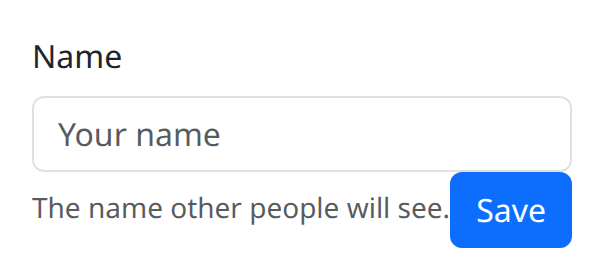
def demo() -> None:
    def on_submit() -> None:
        ui.notify("Saved")

    with bs.scope(), bs.form(novalidate=True, on_submit=on_submit):
        bs.label("Name", html_for="name")
        bs.input(id="name", placeholder="Your name", required=True)
        bs.form_text("The name other people will see.")
        bs.button("Save")
Options
Validation feedback
Compose validation with Input.valid / Input.invalid and FormFeedback.
FormFeedback.type selects valid versus invalid styling; tooltip=True shows
the message as a tooltip instead of inline text. novalidate=True on Form
turns off native browser bubbles so these messages are the ones the user sees.
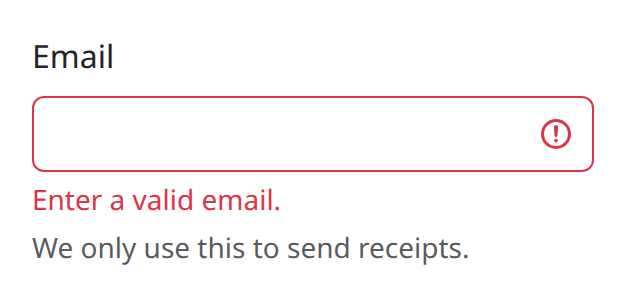
def demo() -> None:
    with bs.scope(), bs.form(novalidate=True):
        bs.label("Email", html_for="email")
        bs.input(id="email", type="email", invalid=True)
        bs.form_feedback("Enter a valid email.", type="invalid")
        bs.form_text("We only use this to send receipts.", color="muted")
Label
Label is the Bootstrap form label. html_for points at the control id.
hidden keeps the label available to assistive tech without drawing it.
check=True styles a checkbox or radio label. size, align, color, and
the grid keys width, xs, sm, md, lg, xl, and xxl let the label
sit in a horizontal layout beside its control.
FormText and FormFloating
FormText is muted help copy under a control; optional color overrides the
default hint color. FormFloating is the floating-label group. Child order is
control then label and is not reordered for you. Set html_for on the floating
wrapper or the label so the pair stays associated.
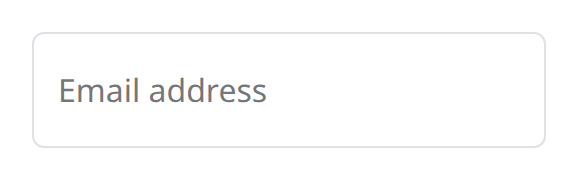
def demo() -> None:
    with bs.scope(), bs.form_floating():
        bs.input(placeholder="name@example.com", id="flt")
        bs.label("Email address", html_for="flt")
InputGroup and InputGroupText
Inside a form, InputGroup clusters a control with add-on text. Put
InputGroupText before the input to prepend, after it to append. size on the
group (sm / lg) scales the whole cluster. See InputGroup
for more composition examples.
Submit wiring
action and method map to the HTML attributes when you truly want a
browser-level post. on_submit is the NiceGUI-facing callback. n_submit
counts successful submit events if you need a counter in state, but the
callable is the primary API.
Notes
DBC-style n_submit counters are adapted for NiceGUI: prefer on_submit over
polling the counter. There is no separate n_clicks on Form; use Button
click handlers for non-submit actions inside the form.
Argument reference
| Property | Type | Default | DBC 2.0.4 name | Support (native) | Support (compat) |
|---|---|---|---|---|---|
| children | a list of or a singular dash component, string or number | None | children | supported | supported |
| id | string | None | id | supported | supported |
| n_submit | number | 0 | n_submit | supported | supported |
| style | unknown | None | style | supported | supported |
| class_name | string | None | className | supported | supported |
| action | string | None | action | supported | supported |
| method | a value equal to: 'GET', 'POST' | None | method | supported | supported |
| prevent_default_on_submit | boolean | True | prevent_default_on_submit | supported | supported |
| key | string | None | key | unsupported | unsupported |
| class_name | string | None | className | supported | supported |